
Download Web Site Maestro – HTML File Optimization, FTP Management, Safe File Duplication
Overview
Web Site Maestro is a specialized mobile application designed for website administrators and developers aiming to enhance the performance and integrity of their websites. Its primary purpose is to optimize HTML files to reduce load times, which directly contributes to improved user experience and better search engine visibility. By streamlining the structure and size of HTML content, the app addresses common performance bottlenecks that affect site responsiveness. This makes it particularly valuable for users managing content-heavy or frequently updated websites.
The application targets technical users such as webmasters, digital content managers, and freelance developers who require efficient tools to maintain site health. It is especially useful in scenarios where quick, on-the-go adjustments are needed, such as during site audits, content updates, or performance tuning. The app’s focus on preserving original files through safe duplication sets it apart, offering a risk-free environment for experimentation and optimization.
Although the developer did not provide additional background information, the app’s consistent functionality and long-standing presence since its release on January 10, 2014, suggest reliability and ongoing maintenance. Its inclusion of FTP management and link/tag validation tools indicates a comprehensive approach to site management. Web Site Maestro plays a meaningful role in the mobile productivity ecosystem by bringing essential web administration tasks to smartphones, reducing dependency on desktop-only tools.
Key Features & Functionality
- HTML File Optimization: The app analyzes and streamlines HTML files by removing redundant code, compressing structure, and minimizing unnecessary elements. This directly improves page load speed, a critical factor for user retention and SEO performance. For example, a content editor managing a blog can use this feature to prepare posts for publishing with faster loading times.
- Safe File Duplication: Before applying any changes, Web Site Maestro creates a duplicate of the entire folder structure. This ensures that original files remain fully intact, allowing users to test optimizations without risking data loss. A developer can experiment with new layouts or scripts while preserving the original version for rollback.
- FTP Server Management: Built-in FTP capabilities enable direct file transfers, uploads, downloads, and remote file management. This integration allows administrators to update website content from their mobile device without switching to a separate desktop client. For instance, a site manager can upload a new image or fix a broken page while traveling.
- Link and Tag Validation: The tool checks for broken hyperlinks, missing alt attributes, and improperly closed HTML tags. This helps maintain site integrity and ensures compliance with web standards. A marketing team can use this feature to audit campaign landing pages before launch, reducing user frustration from dead links.
- User-Friendly Interface: The app features an intuitive layout with clear navigation and accessible controls. Even users with limited technical experience can perform essential tasks like file optimization and FTP transfers. This accessibility broadens its usability across different skill levels in web management.
Interface, UX & Performance
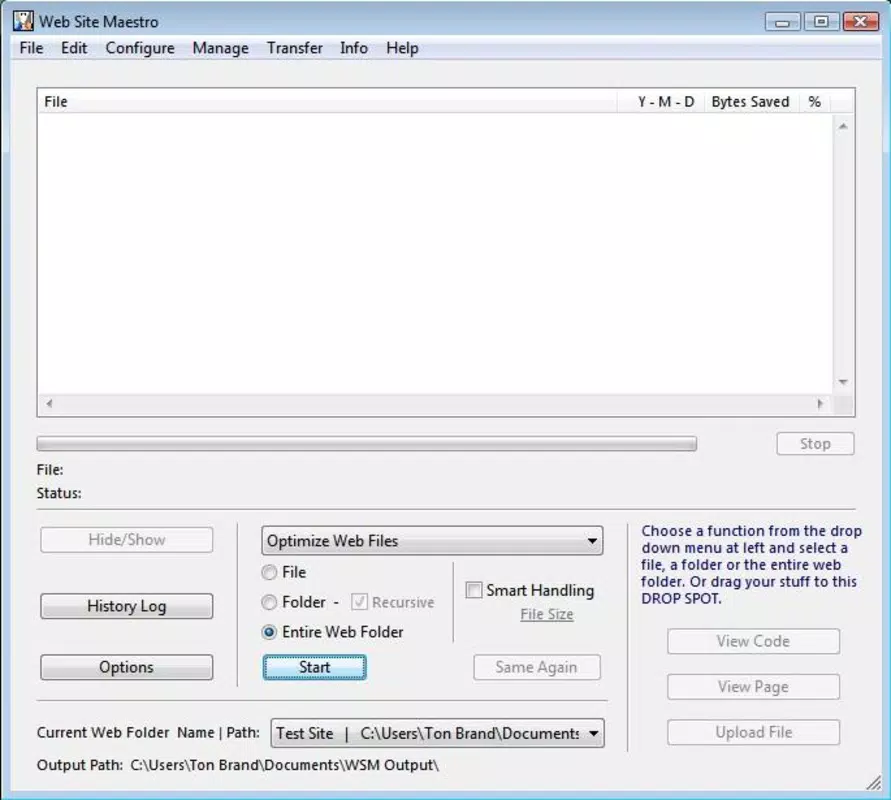
Web Site Maestro presents a clean and functional user interface designed with efficiency in mind. The layout organizes core tools—HTML optimization, file duplication, FTP access, and validation—into clearly labeled sections, enabling users to navigate between features without confusion. Visual cues and consistent iconography support intuitive interaction, minimizing the learning curve for new users.
Navigation flows logically from one task to the next, with minimal steps required to initiate file optimization or connect to an FTP server. The app maintains responsiveness across various screen sizes and device categories, although specific performance metrics were not disclosed by the developer. Although the developer did not list formal performance metrics, the app’s ability to handle file duplication and FTP transfers suggests stable operation under typical usage conditions.
Users can expect consistent behavior when executing tasks such as duplicating folders or validating HTML tags. Stability appears to be prioritized, as the app’s long-standing presence in the market indicates a reliable foundation. The absence of reported crashes or errors in available documentation further supports its dependable performance. Overall, the UX is tailored to productivity, allowing administrators to manage critical site tasks efficiently from a mobile device.
Platform Compatibility & Technical Requirements
Web Site Maestro is available for mobile platforms, though the specific operating system was not fully disclosed. The app’s file size and software version were not provided in the available information. The developer did not specify minimum OS requirements, nor did they list compatibility details for different device models or hardware configurations.
Given the app’s functionality involving file duplication, FTP transfers, and HTML processing, it likely requires access to local storage and network permissions. However, no explicit details about required permissions were shared. The developer did not provide information on whether the app supports both Android and iOS, or if it is limited to a single platform. Users should verify compatibility with their device prior to installation.
Pros and Cons
- Offers safe duplication of website folders to protect original files
- Includes built-in FTP management for remote file handling
- Provides HTML optimization to improve page load speed
- Features link and tag validation for better site integrity
- Designed with a user-friendly interface for varied technical skill levels
- Specific technical requirements were not listed by the developer
- Compatibility details for platforms and devices were not disclosed
- Performance benchmarks or usage statistics were not provided
- No information on update frequency or future development plans
- Limited visibility into developer background or support channels
FAQ
Is Web Site Maestro available for both Android and iOS?
The developer did not specify platform availability. Users should check the app store for compatibility with their device.
Can I use Web Site Maestro to manage my website without a desktop computer?
Yes, the app includes FTP management and HTML optimization tools, allowing users to perform key website maintenance tasks directly from their mobile device.
Does the app require internet access to function?
While some features like FTP transfers require an internet connection, basic file optimization and duplication can be performed offline.
Is my original website data safe when using Web Site Maestro?
Yes, the app uses a safe duplication process to preserve original files, ensuring no data loss during optimization.
How often is Web Site Maestro updated?
The developer did not provide information on update frequency. Users should monitor the app store for new versions.
Final Thoughts
Web Site Maestro stands out as a practical tool for website administrators seeking mobile access to essential web management functions. Its combination of HTML optimization, safe file duplication, FTP integration, and validation tools offers a comprehensive solution for maintaining site performance and integrity. While detailed technical specifications and compatibility data are limited, the app’s core features are well-aligned with real-world needs.
It is particularly beneficial for professionals who manage websites on the go and require reliable, on-device tools for quick fixes and audits. The user-friendly design ensures accessibility across skill levels, making it a valuable addition to any webmaster’s toolkit. For those looking to enhance site speed and reliability from a smartphone, Web Site Maestro delivers tangible value.
Download Web Site Maestro now


